Experiment: Global Schedule Speed (A01 Long v2 Series)
This experiment tests the effect of global_schedule_speed (and related env tweaks) on A01 single-map long training. Runs: A01_as20_long_v2, v2.1, v2.2, v2.3, v2.4. Goal: see whether a faster schedule (e.g. global_schedule_speed: 4) helps break the 24.5 s barrier on A01.
Experiment Overview
We compared five runs from the A01_as20_long_v2 series. global_schedule_speed multiplies frame counts in LR/gamma/epsilon schedules, so higher values progress through the schedule faster (in terms of environment steps). Some runs also changed tm_engine_step_per_action, n_zone_centers_in_inputs, and n_zone_centers_extrapolate_before_start_of_map, so the comparison mixes schedule speed with environment resolution.
Main hypothesis: global_schedule_speed: 4 may help reach sub-24.5 s on A01 compared to 1 or 8.
Results
Important: If run durations differed, interpret by-time tables using the script’s time axis (default auto → cumulative training hours when logged, not raw wall minutes across merged TB chunks). Use scripts/analyze_experiment_by_relative_time.py and optionally scripts/audit_tensorboard_training_timeline.py; see Experiments.
Key findings:
Final best A01 from saved run state (
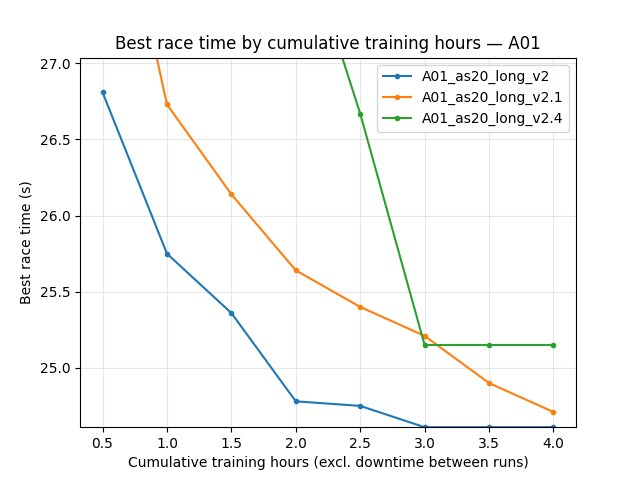
save/<run>/accumulated_stats.joblib): -A01_as20_long_v2: 24.150s (24150ms) -A01_as20_long_v2.1: 24.440s (24440ms) -A01_as20_long_v2.2: 300.000s (no successful finish recorded) -A01_as20_long_v2.3: 300.000s (no successful finish recorded) -A01_as20_long_v2.4: 25.150s (25150ms)Ranking by final best A01 is therefore: v2 (gss=4) > v2.1 (gss=8) > v2.4 (gss=1) >> v2.2/v2.3.
For TensorBoard comparisons, runs must be merged across suffix chunks (
run,run_2,run_3, …); otherwise best values can be under-reported.
Run Analysis
A01_as20_long_v2: global_schedule_speed: 4. Default env: tm_engine_step_per_action 5, n_zone_centers 40, batch 4096. Single map A01, long run (tensorboard_suffix_schedule up to 150M steps). Save:
save\A01_as20_long_v2.A01_as20_long_v2.1: global_schedule_speed: 8. Same env as v2. Save:
save\A01_as20_long_v2.1.A01_as20_long_v2.2: global_schedule_speed: 8. Env: tm_engine_step_per_action 1, n_zone_centers_in_inputs 200, n_zone_centers_extrapolate_before_start_of_map 100. Save:
save\A01_as20_long_v2.2.A01_as20_long_v2.3: global_schedule_speed: 1. Same env as v2.2 (tm_engine_step 1, n_zone 200). Save:
save\A01_as20_long_v2.3.A01_as20_long_v2.4: global_schedule_speed: 1. Env: tm_engine_step_per_action 3, n_zone_centers 40. Save:
save\A01_as20_long_v2.4.
TensorBoard logs: tensorboard\A01_as20_long_v2, tensorboard\A01_as20_long_v2.1, … (and suffix dirs _2, _3, … where applicable). Reproduce comparison:
python scripts/analyze_experiment_by_relative_time.py A01_as20_long_v2 A01_as20_long_v2.1 A01_as20_long_v2.2 A01_as20_long_v2.3 A01_as20_long_v2.4 --interval-training-hours 0.25 --step_interval 1000000 --logdir tensorboard
Use --plot --output-dir docs/source/_static --prefix exp_global_schedule_speed_v2 to generate comparison plots. The script prints per-run duration in hours (cumulative training) or minutes (wall), depending on the axis chosen.
Detailed TensorBoard Metrics Analysis
Methodology — By time and by steps: Prefer cumulative-training-hour checkpoints (--time-axis auto) or BY STEP tables. Race times from per-race Race/eval_race_time_*, Race/explo_race_time_*; scalars (loss, Q, GPU %) = last value at that checkpoint. The figures below use the same default as generate_experiment_plots.py (training hours on X when the scalar exists).
Runs v2 / v2.1 / v2.4: v2 and v2.1 show wall ≫ training (~2.4–2.7×); v2.4 is ~1× (short run). See Time axis conventions (experiment write-ups) audit table. Fill subsections from script output (cumul_training_hours or BY STEP). Example command:
python scripts/analyze_experiment_by_relative_time.py A01_as20_long_v2 A01_as20_long_v2.4 --interval-training-hours 0.25 --step_interval 1000000 --logdir tensorboard
A01 (per-race eval_race_time_trained_A01)
Report best/mean/std, finish rate, and first finish (min) at selected checkpoints (e.g. 60 min, 120 min) and at step checkpoints (e.g. 500k, 1M). Compare v2 (gss=4) vs v2.4 (gss=1) vs v2.1 (gss=8) over the common window.
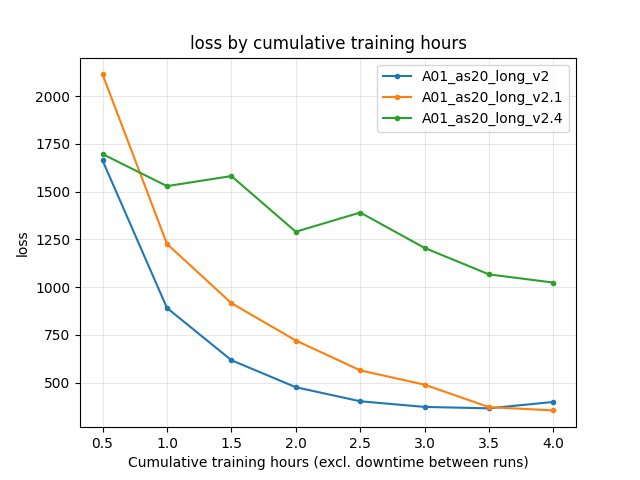
Training Loss
At same relative time and step checkpoints; compare across runs.
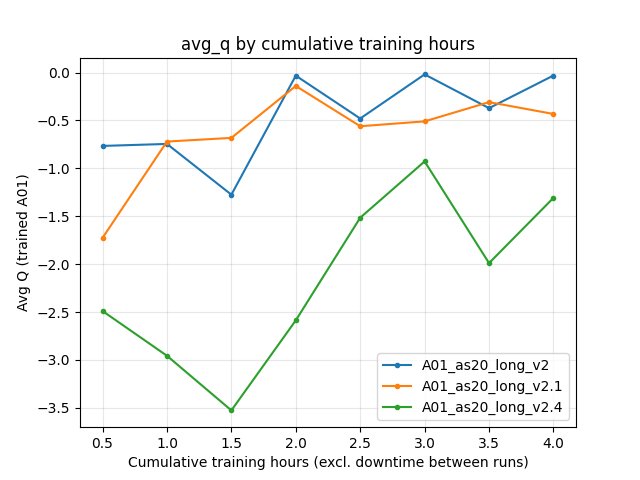
Average Q-values (RL/avg_Q_trained_A01)
At same checkpoints.
GPU Utilization
Performance/learner_percentage_trainingover the common window.
Configuration Changes
Training (training in config YAML):
global_schedule_speed: 1 (v2.3, v2.4), 4 (v2), 8 (v2.1, v2.2).
run_name:
A01_as20_long_v2,A01_as20_long_v2.1, …A01_as20_long_v2.4.batch_size: 4096; lr_schedule, gamma_schedule, tensorboard_suffix_schedule shared across runs (schedules are multiplied by global_schedule_speed in code).
Environment (where different):
v2, v2.1: tm_engine_step_per_action 5, n_zone_centers_in_inputs 40, n_zone_centers_extrapolate_before_start_of_map 20.
v2.2, v2.3: tm_engine_step_per_action 1, n_zone_centers_in_inputs 200, n_zone_centers_extrapolate_before_start_of_map 100.
v2.4: tm_engine_step_per_action 3, n_zone_centers_in_inputs 40, n_zone_centers_extrapolate_before_start_of_map 20.
Hardware
Document GPU, number of collectors, and system if known (e.g. from run logs or machine).
Conclusions
global_schedule_speed: 4 (v2) is the strongest setting in this series by final best A01 (24.150s), beating both gss=8 (best 24.440s) and gss=1 variants (best 25.150s in v2.4).
v2.2/v2.3 (finer env) vs v2/v2.4 (coarser env) confound schedule speed with environment resolution; separate ablations can clarify.
Recommendations
Use global_schedule_speed: 4 when targeting sub-24.5 s on A01 with the current long-training setup.
Re-run
analyze_experiment_by_relative_time.pyfor the five runs to fill exact durations and metric tables; use--plotto regenerate comparison JPGs and embed them in this page (one metric per graph, with:alt:captions).
Analysis tools:
By relative time and by steps:
python scripts/analyze_experiment_by_relative_time.py A01_as20_long_v2 A01_as20_long_v2.1 A01_as20_long_v2.4 --interval 5 --step_interval 1000000(add--logdir "<path>"if not from project root). Outputs both relative-time and BY STEP tables.With plots: add
--plot --output-dir docs/source/_static --prefix exp_global_schedule_speed_v2.Key metrics: per-race
Race/eval_race_time_trained_A01,Race/explo_race_time_trained_A01; scalarsTraining/loss,RL/avg_Q_trained_A01,Performance/learner_percentage_training,alltime_min_ms_A01.