Experiment: Multi-action Offset Training (A01_as20_long v3 series)
Experiment Overview
This experiment evaluates a new RL training mode where the agent learns with multi-action time offsets.
In multi-action mode (rl_action_offsets_ms has more than one value), the policy makes a single forward pass and predicts N actions for offsets 0, 10, 20, ... ms. The rollout then applies these actions on a 10 ms step period, and a replay transition corresponds to one decision block (N actions + aggregated reward over N steps). Exploration can be configured as either:
multi_action_exploration: per_action: epsilon is sampled independently per action inside the block.multi_action_exploration: per_block: one epsilon draw applies to the whole block (either all greedy or all random).
Because a decision is made per block (N actions spanning multiple 10 ms steps), multi-action lookahead is applied at a lower decision frequency than single-action training, and in per_block mode the fully-random blocks become increasingly rare as epsilon decays.
Runs compared on map A01:
A01_as20_long_v3: multi-action enabled,multi_action_explorationdefault (per_action),global_schedule_speed = 1, no BC head pretrain.A01_as20_long_v3.1: same multi-action setup,multi_action_exploration = per_blockand faster schedules (global_schedule_speed = 4).A01_as20_long_v3.1_pretrained_bc: same as v3.1 but initializes RL from BC heads withpretrain_bc_heads_path: output/ptretrain/bc/v5_multi_offset.
Notes on why global_schedule_speed = 4: this choice is based on the earlier ablation in docs/source/experiments/global_schedule_speed.rst (A01 long v2 series). The best saved A01 time is alltime_min_ms['A01'] = 24150 (i.e. ~``24.15s``) in save\\A01_as20_long_v2; in TensorBoard it shows up in the suffixed continuation run tensorboard\\A01_as20_long_v2_3.
For “longest run” comparison (almost 100M+ training steps): A01_as20_long (single-map A01, trained with tensorboard_suffix_schedule up to ~150M steps).
Results
Important: run lengths differ. Primary quantitative comparisons here use training steps (BY STEP tables from the analysis script). Any time-axis prose or regenerated tables must use cumulative training hours (--time-axis auto or cumul_training_hours), not raw TensorBoard wall minutes across merged logs — see Experiments.
Key findings
Multi-action schedule speedup (v3 → v3.1):
A01_as20_long_v3.1reaches strongalltime_min_ms_A01much earlier in environment steps thanA01_as20_long_v3(see BY STEP output from the analysis command in Analysis Tools).BC head pretraining (v3.1 → v3.1_pretrained_bc) improves peak time and finish rate at matched steps: - At 20M steps: eval best time
24.570sand finish rate59%forv3.1_pretrained_bcvs24.850sand45%forv3.1. - At 80M steps: eval best time24.260sand finish rate73%forv3.1_pretrained_bcvs24.410sand67%forv3.1.Comparison with the longest run
A01_as20_long(step overlap is limited — common window only to ~19.2M steps): at that shared step,v3.1_pretrained_bchas better best time (24.570svs24.510s) but lower finish rate (59%vs71%). The fullv3.1_pretrained_bcrun continues well beyond that overlap; the final logged best A01 24.26s comes from the longer run.Direct check:
A01_as20_long_v3.1vsA01_as20_long_v2(TB merged across suffix dirs). By steps (1M checkpoints),v2stays ahead on A01 eval best time (e.g. 20M:24.460svs24.850s; 40M:24.300svs24.470s; 80M:24.200svs24.410s). Final saved bests fromsave/<run>/accumulated_stats.joblib:v2 = 24.150s(24150ms),v3.1 = 24.410s(24410ms).Main baseline vs multi-offset + BC heads:
A01_as20_long_v2(single-action) vsA01_as20_long_v3.1_pretrained_bc(multi-action +v5_multi_offsetBC init); see Direct comparison: v2 vs v3.1_pretrained_bc for tables, plots, and save-state check. In short:v2keeps better best and mean eval times and higher eval finish rate in the common window; savedalltime_min_ms['A01']is24150ms vs24260ms.
Run Analysis
A01_as20_long_v3/v3.1/v3.1_pretrained_bc: merged TensorBoard dirs. Cumulative training for curves =cumul_training_hours(TB /save/.../accumulated_stats.joblib). Example:save/A01_as20_long_v3.1_pretrained_bc/≈ 24.5 h training, A01 best 24260 ms.A01_as20_long(longest reference): same rules; see Time axis conventions (experiment write-ups) audit table.A01_as20_long_v2: merged 3 TB dirs. Audited (local logs): ~17.7 h cumulative training vs ~2898 min TB wall span (ratio ~2.7×) — wall minutes must not be read as training duration. Pair withv3.1_pretrained_bc: ~24.5 h training vs ~3222 min wall (~2.2×).
Direct comparison: v2 vs v3.1_pretrained_bc
This section compares single-action A01_as20_long_v2 to multi-action + BC-pretrained A01_as20_long_v3.1_pretrained_bc. Merged suffix logs (3 vs 4 dirs). Cumulative training totals: ~17.74 h (v2) vs ~24.51 h (v3.1_bc); common BY TIME window ends at ~17.74 h (v2 stops earlier in training time). TB wall spans are ~2900 min vs ~3220 min — not the same as those training hours (see Time axis conventions (experiment write-ups)).
Save-state cross-check: save/.../accumulated_stats.joblib bests 24150 ms vs 24260 ms — matches 100M-step BY STEP eval-best rows and the last cumul_training_hours checkpoints below.
Recomputed BY TIME table (Race/eval_race_time_trained_A01, --time-axis cumul_training_hours, --interval-training-hours 1, merged TB, 2026-03):
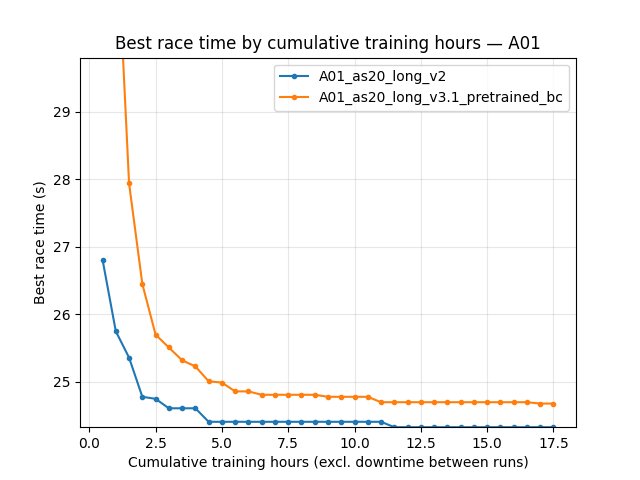
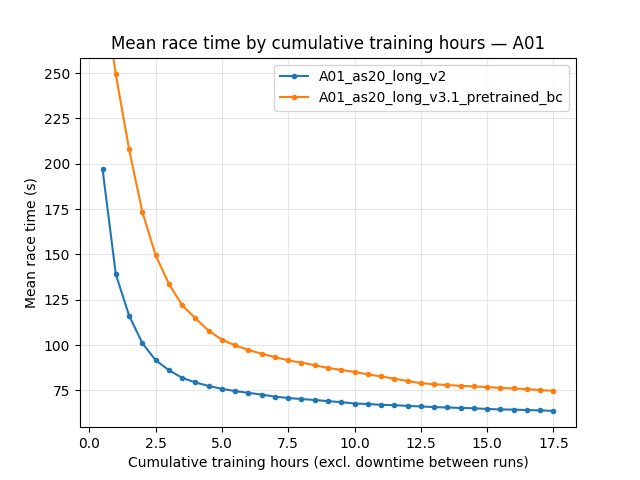
2 h: best 24.55s vs 25.58s; mean 129.4s vs 184.7s; eval finish rate 62% vs 43%.
8 h: best 24.29s vs 24.40s; mean 91.0s vs 115.7s; rate 76% vs 68%.
~17.7 h (end of common window): best 24.15s vs 24.26s; mean 80.7s vs 98.6s; rate 80% vs 74%.
By-step comparisons use a common window up to 100M steps. Embedded figures use cumulative training hours on X (generate_experiment_plots.py default auto).
Detailed TensorBoard Metrics Analysis
Methodology — By time vs by steps: Regenerate the BY TIME grid with explicit training-hours axis:
python scripts/analyze_experiment_by_relative_time.py A01_as20_long_v2 A01_as20_long_v3.1_pretrained_bc --time-axis cumul_training_hours --interval-training-hours 1 --step_interval 5000000
BY STEP uses the same command (step grid unchanged). Do not use wall-minute checkpoints for this pair: wall span >2× active training time (Time axis conventions (experiment write-ups)).
Figures: python scripts/generate_experiment_plots.py --experiments multi_offset_v2_vs_v31bc_pretrained
A01 eval — best time (Race/eval_race_time_trained_A01)
By cumulative training hours: see the 2 h / 8 h / ~17.7 h rows in the section above (recomputed from merged TensorBoard).
By steps: at 20M — 24.46s vs 24.57s; at 100M — 24.15s vs 24.26s.
A01 eval — mean time (all episodes; includes DNF / cutoff races)
Mean time is dominated by non-finished runs; use it as a stability / typical-episode signal alongside best time.
By cumulative training hours: mean-time checkpoints are in the same BY TIME table output as for best time (see command above).
By steps: at 100M — 80.69s vs 98.50s mean eval time; eval finish rate 80% vs 74%.
Configuration differences (this pair)
``A01_as20_long_v2`` (save/A01_as20_long_v2/config_snapshot.yaml): single-action setup (no rl_action_offsets_ms list in snapshot; n_prev_actions_in_inputs: 5); training.global_schedule_speed: 4; training.pretrain_bc_heads_path: null.
``A01_as20_long_v3.1_pretrained_bc`` (save/A01_as20_long_v3.1_pretrained_bc/config_snapshot.yaml): environment.rl_action_offsets_ms: [0, 10, 20, 30, 40]; n_prev_actions_in_inputs: 25; exploration.multi_action_exploration: per_block; training.global_schedule_speed: 4; training.pretrain_bc_heads_path: output/ptretrain/bc/v5_multi_offset.
Configuration Changes
The runs share the same multi-action offsets:
environment.rl_action_offsets_ms = [0, 10, 20, 30, 40](N=5 actions per decision block; applied on 10 ms rollout cadence).
Differences:
A01_as20_long_v3: -training.global_schedule_speed = 1-exploration.multi_action_explorationuses default (per_action) -training.pretrain_bc_heads_path = nullA01_as20_long_v3.1: -training.global_schedule_speed = 4-exploration.multi_action_exploration = per_block-training.pretrain_bc_heads_path = nullA01_as20_long_v3.1_pretrained_bc: -training.global_schedule_speed = 4-exploration.multi_action_exploration = per_block-training.pretrain_bc_heads_path = output/ptretrain/bc/v5_multi_offset
Hardware
GPU: not extracted here (see individual run logs).
Parallel instances:
gpu_collectors_count = 8for the v3.1_pretrained_bc run.
Conclusions
Multi-action offset training works and is sensitive to schedule speed and exploration granularity: - Going from v3 to v3.1 (faster schedule + per_block exploration) improves early learning and reaches the ~24.8-24.5 s range quickly.
Pretraining the RL heads from the multi-offset BC run (v5_multi_offset) provides a durable benefit: - Higher peak time and higher finish rate at the same step levels (20M -> 80M). - Best time improvements continue through tens of millions of steps (see BY STEP rows above). - Likely reason: better temporal/action mapping between pretrain and RL. In BC pretrain, the model predicts 5 offset actions at 10 ms spacing; in multi-action RL, one decision is taken every ~50 ms and outputs a 5-action block. This alignment is much closer than the older single-action RL setup (one action every ~50 ms), where pretrain-to-RL mapping was weak.
Against the longest existing baseline (
A01_as20_longtrained up to ~150M steps), the offset+pretrained agent has a slower start but catches up later and slightly improves the final peak time in the shared window.Against ``A01_as20_long_v2`` (single-action, same
global_schedule_speed = 4), multi-offset + BC heads (``v3.1_pretrained_bc``) still trails on best eval time, mean eval time, and eval finish rate on the shared cumulative-training-hours window (figures / BY TIME table) and at 100M steps; saved bests 24.150s vs 24.260s (see Direct comparison: v2 vs v3.1_pretrained_bc).
Recommendations
If you adopt multi-action offsets, try
global_schedule_speed = 4andmulti_action_exploration = per_blockas the first tuning pair.If you can afford it, initialize from a multi-offset BC run (here:
v5_multi_offset) to improve long-run finish rate and to raise the achievable best time at large step counts.For comparisons against other “longest run” baselines, expect limited step overlap if logging stops at different ranges; use training-hours (or wall, if you must) curves from the analysis script or embedded plots.
Analysis Tools
Compare v3 variants (default auto time axis + by steps; recommended:
--step_interval 1000000):python scripts/analyze_experiment_by_relative_time.py A01_as20_long_v3 A01_as20_long_v3.1 A01_as20_long_v3.1_pretrained_bc --interval-training-hours 0.5 --step_interval 1000000Compare against the longest baseline
A01_as20_long:python scripts/analyze_experiment_by_relative_time.py A01_as20_long_v3.1_pretrained_bc A01_as20_long --interval-training-hours 0.5 --step_interval 1000000Compare v2 vs v3.1_pretrained_bc (BY TIME + BY STEP):
python scripts/analyze_experiment_by_relative_time.py A01_as20_long_v2 A01_as20_long_v3.1_pretrained_bc --interval-training-hours 0.5 --step_interval 5000000Plots for docs:
python scripts/generate_experiment_plots.py --experiments multi_offset_v2_vs_v31bc_pretrained. One-off JPG:python scripts/analyze_experiment_by_relative_time.py A01_as20_long_v2 A01_as20_long_v3.1_pretrained_bc --time-axis cumul_training_hours --interval-training-hours 0.5 --step_interval 5000000 --plot --output-dir docs/source/_static --prefix exp_multi_offset_v2_vs_v31bc_pretrainedAudit wall vs training time:
python scripts/audit_tensorboard_training_timeline.py --runs A01_as20_long_v2 A01_as20_long_v3.1_pretrained_bc